What Does Collate Mean When Printing?
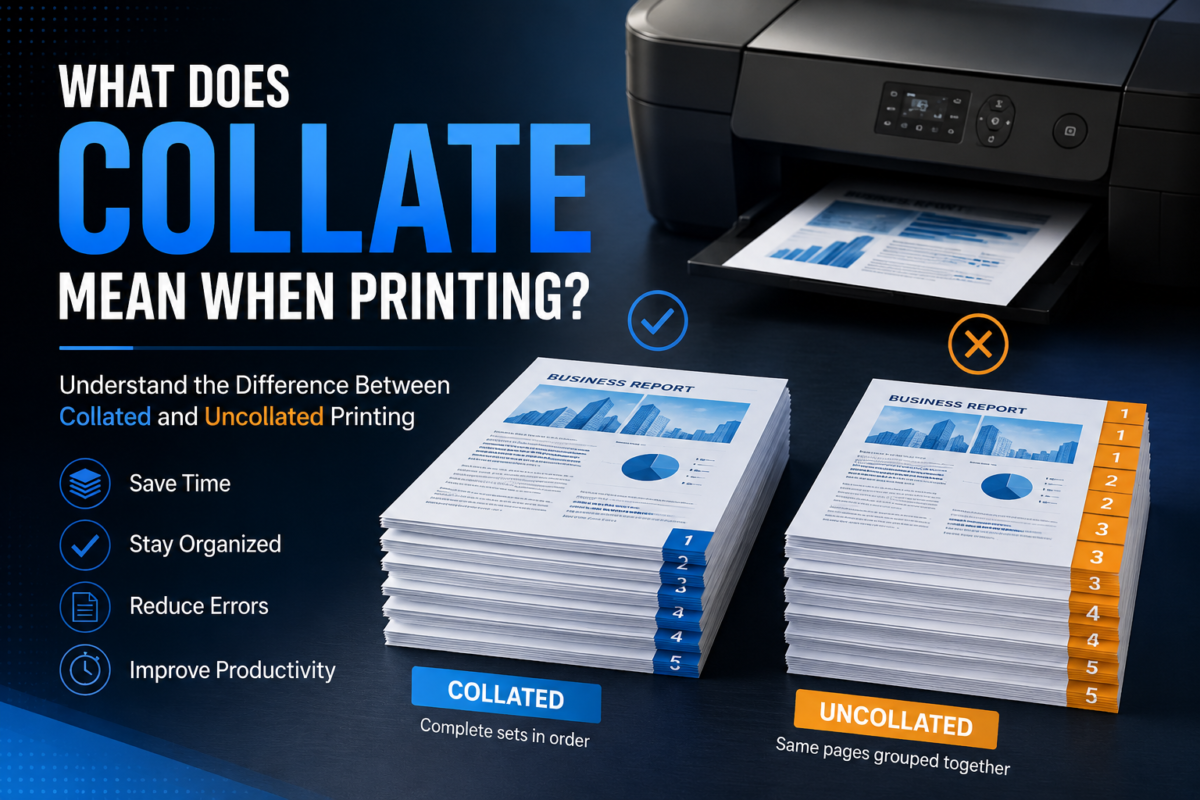
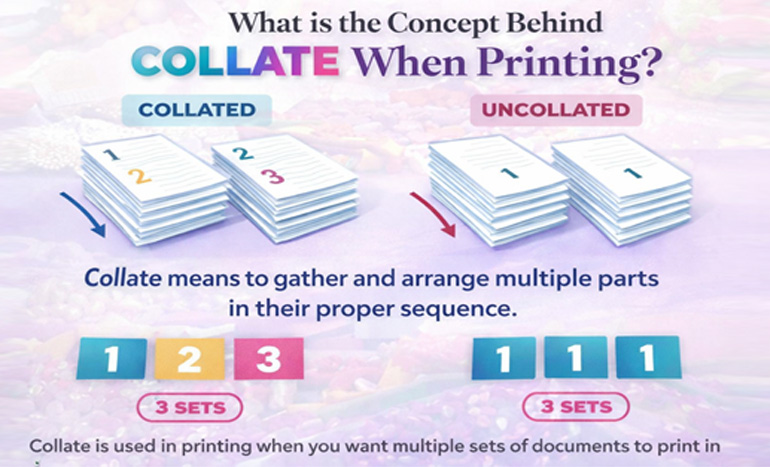
Many people see the “Collate” option when printing documents but are unsure what it actually does. In simple terms, collate is a printer setting that automatically arranges multiple copies of a multi-page document into complete sets in the correct order.
For example, if you print three copies of a five-page document, collated printing produces:
1, 2, 3, 4, 5
1, 2, 3, 4, 5
1, 2, 3, 4, 5
Without collation, the printer groups identical pages together:
1, 1, 1
2, 2, 2
3, 3, 3
4, 4, 4
5, 5, 5
Understanding what collate means when printing can help you save time, reduce sorting mistakes, and keep reports, manuals, presentations, and business documents properly organized.
| Feature | Collated Printing | Uncollated Printing |
| Page Order | Complete document sets | Same pages grouped together |
| Manual Sorting | Not required | Required |
| Best For | Reports, manuals, presentations | Bulk page assembly |
| Time Saving | High | Low |
| Risk of Page Mix-Ups | Low | Higher |
| Ready to Distribute | Yes | No |
What Does Collate Mean on a Printer?
Many people inquire about what does collate mean on a printer when checking print settings.
It is a feature that will organize pages into whole document sets automatically when printing multiple copies.
For a deeper technical explanation of printer settings and document handling, you can also refer to official Microsoft printing documentation.
Learn more about printing options and settings (Microsoft Support).
Where to Find the Collate Option in Printer Settings
Besides, the collate feature is often found in the printer dialogue box under copy settings. A large number of programs indicate a box to check or a drop-down menu for turning collation on or off.
Why Most Modern Printers Include Collation
Nowadays, printers are equipped with this function as it helps users save time, decrease the amount of sorting work, and improve the organization of documents at the same time for both home and office users.
If you are involved in packaging or bulk print production, understanding print preparation is just as important as packaging design. You can explore how professional packaging quality impacts branding through custom packaging solutions.
Learn more about custom packaging solutions for business branding at Claws Custom Boxes.
Why Do Printers Have a Collate Option?
The collate feature exists to make printing multiple copies of multi-page documents easier and more efficient. Instead of forcing users to manually organize pages after printing, the printer automatically produces complete document sets.
This is especially useful when printing:
- Reports
• Training manuals
• Presentations
• Employee handbooks
• Educational materials
• Financial documents
• Product catalogs
Without collation, users may spend significant time sorting pages manually, especially when printing large quantities.
What Does Collated Mean in Printing?
To understand What does collate mean in printing, one should review the differences between collated and uncollated document sets.
Understanding Collated Copies
Collated copies are complete sets of documents produced so that the pages are in the right order. Each copy is formatted such that it can be given out immediately after printing.
Understanding Uncollated Copies
Uncollated copies are produced by printing groups of the same pages. They are useful. But, before usage, they need manual sorting.
Collated vs Uncollated Printing: What’s the Difference?
The main difference is how pages are arranged during the printing process.
| Feature | Collated | Uncollated |
| Page Order | Complete sets | Grouped pages |
| Manual Sorting | Minimal | Required |
| Best for Reports | Yes | No |
| Best for Bulk Assembly | Sometimes | Yes |
When to Use Collated Printing
In general, you should consider collated printing when making copies of items like reports, proposals, presentations, and manuals that will be given to others immediately.
When to Use Uncollated Printing
You probably want to use uncollated printing if you intend to put the pages together after printing or if various people will be responsible for sorting the document sets.
How Does Collating Work When Printing?
Many people are curious about What does collating mean when printing and how exactly the process is carried out.
Step 1: Set the Number of Copies
Determine the quantity of copies you require the document to be.
Step 2: Turn on the Collate Feature
Check the collate option before starting the print job.
Step 3: Printer Automatically Arranges Pages
The printer’s software identifies the right order of pages and prints them because of this.
Step 4: Get Complete Sets of Documents
The output of each copy is in proper order; each set is ready for use.
Why Is Collating Important?
Collation provides several practical benefits in both personal and professional environments.
Improves Printing Accuracy
Papers stay in order right after printing.
Improves Document Organization
Users rarely misplace pages or hand them to others incorrectly.
Prevents Page Mix-Ups
It takes less effort for a user to manually put pages together post-printing.
Reduces Manual Sorting
Automatic page ordering significantly minimizes errors.
Common Real-World Uses of Collated Printing
Business Reports
Companies frequently print collated reports for meetings, client presentations, and internal documentation.
Training Materials
Training manuals and employee onboarding packets are easier to distribute when every copy is already organized.
Educational Documents
Teachers and schools often use collated printing for worksheets, study guides, and classroom handouts.
Instruction Manuals
Manufacturers use collation to ensure instruction manuals remain in the correct reading order.
Financial Documents
Invoices, statements, contracts, and accounting records must often be distributed in complete document sets.
Booklets and Catalogs
Collation simplifies the assembly process for booklets, catalogs, and marketing materials.
Printing accuracy is also crucial in product packaging industries where labels, inserts, and branding materials must stay in perfect order. For example, industries like candle packaging rely heavily on structured print and packaging design.
Explore premium packaging options in our candle boxes collection.
Benefits of Collating Documents Before Printing
One of the primary reasons people ask What does it mean to collate when printing is that they want to know the benefits.
Saves Time
With collation, one no longer needs to manually sort the pages.
Reduces Human Errors
Automatic arrangement greatly reduces the chances of making errors during the assembling stage.
Raise Productivity
Handling and distributing large printing orders becomes much more manageable.
Delivers Professional Results
Well-organized documents present a neat and professional image.
Maximize Workflow Efficiency
Personnel can dedicate their time to more productive and value-added work rather than document preparation.
Well-structured printing workflows are also important when preparing custom rigid packaging designs, where precision and consistency matter in every layer of the box structure.
See our premium range of custom rigid packaging boxes.
Does Collating Affect Print Speed?
Often one of the concerns is whether collation reduces the speed of printing.
Collation Printing Speed
Print jobs that require collation could take marginally longer as the printer needs to arrange the pages to form the entire sets.
Uncollated Printing Speed
Sometimes uncollated printing might be a little faster as the pages are printed in smaller batches.
Which is the Best?
Most users believe that the advantages of the better organization are much more important than the small time difference.
Does Collating Use More Ink or Paper?
Few users question what does collate mean for printing expenses and materials.
Impact on Ink Consumption
Collating will not cost you more ink, as it only affects the order of the printed pages.
Impact on Paper Usage
Whether you collate or not, the amount of paper used will be the same.
Cost Considerations
Labor costs and productivity changes really give the main expense reduction.
Efficient printing is not only about saving ink and paper but also about choosing the right packaging strategy when presenting printed materials professionally.
Read more about importance of quality-oriented packaging for better product presentation.
How to Enable or Disable Collate in Printer Settings
On Windows Computers
OPEN the print dialogue, find the Copies area, and tick or untick the Collate box.
On Mac Computers
Select Print, click to see all printer settings, and check the option to Collate.
In PDF Readers
Typically, you will find a Collate checkbox in the printing menus of PDF readers.
In Microsoft Word and Office Applications
Word, Excel, and PowerPoint allow you to set collation when you print.
Can You Collate Double-Sided Printing?
Yes, collated printing and duplex printing can be done at the same time.
Single-Sided and Double-Sided Collation Comparison
You can also use both print methods to arrange the entire document sets automatically.
Some Tips for Duplex Printing
Always check the page order and do a print preview before running a large print job to minimize formatting problems.
Can All Printers Collate Documents?
Home Printers
Many home printers nowadays include fundamental collation features.
Office Printers
Usually, manufacturers design office printers with advanced collation settings to manage larger printing tasks effectively.
Commercial Printing Equipment
Commercial printers come with high-end document finishing and collation features.
Common Collated Printing Problems and How to Fix Them
Printer Not Collating Properly
Make sure that you turn on collate option in both the software and the printer driver.
Missing Pages in Printed Sets
Check whether your document has any formatting or page-numbering problems.
Incorrect Page Order
Make sure that pages are in the correct order before printing.
Software and Driver Issues
Driver updates for your printer will in many cases fix collation-related errors. If your printing What does collate mean printer settings and they are not operating correctly, performing a driver update is a wise first step.
Final Thoughts: When Should You Use Collated Printing?
There are many definitions of collation. The most straightforward answer to the question, “What does collated mean in printing” is that collation is simply creating multiple copies of one document in order to form sets of pages. By collating from a print job, you will save time and have less chance of errors when you produce a printed report, manual, presentation or educational material. In fact, collation becomes an indispensable asset enabling effective resource management in most situations where printing multi-page documents. Choose Claws Custpm Boxes for best printing results!
Collated vs Uncollated Printing Example
Suppose you need three copies of a five-page document.
Collated Output:
Copy 1: 1, 2, 3, 4, 5
Copy 2: 1, 2, 3, 4, 5
Copy 3: 1, 2, 3, 4, 5
Uncollated Output:
Page 1: 1, 1, 1
Page 2: 2, 2, 2
Page 3: 3, 3, 3
Page 4: 4, 4, 4
Page 5: 5, 5, 5
This example clearly demonstrates why collated printing is preferred when distributing complete multi-page documents.
We cover Guide to Collate Printing with other angle as well for better undersating as well.
Common Questions About Collated Printing
Does collate use more ink?
No. Collation only changes the order in which pages are printed. Ink consumption remains the same.
Does collate use more paper?
No. The number of pages printed does not change whether collation is enabled or disabled.
Should I collate when printing reports?
Yes. Reports, presentations, manuals, and other multi-page documents are usually easier to distribute when collated.
Can I use collate with double-sided printing?
Yes. Most modern printers support both duplex printing and collation simultaneously.
Can a printer collate automatically?
Most modern home and office printers include automatic collation features within their print settings.
 ✦ Written byThe Claws Custom Boxes packaging teamStructural designers and print specialists helping brands get boxes right the first time.
Ask an expert
✦ Written byThe Claws Custom Boxes packaging teamStructural designers and print specialists helping brands get boxes right the first time.
Ask an expert